Release Notes - May 2026
(Version 30 & 36)
Dear Sweett Team,
In this release:
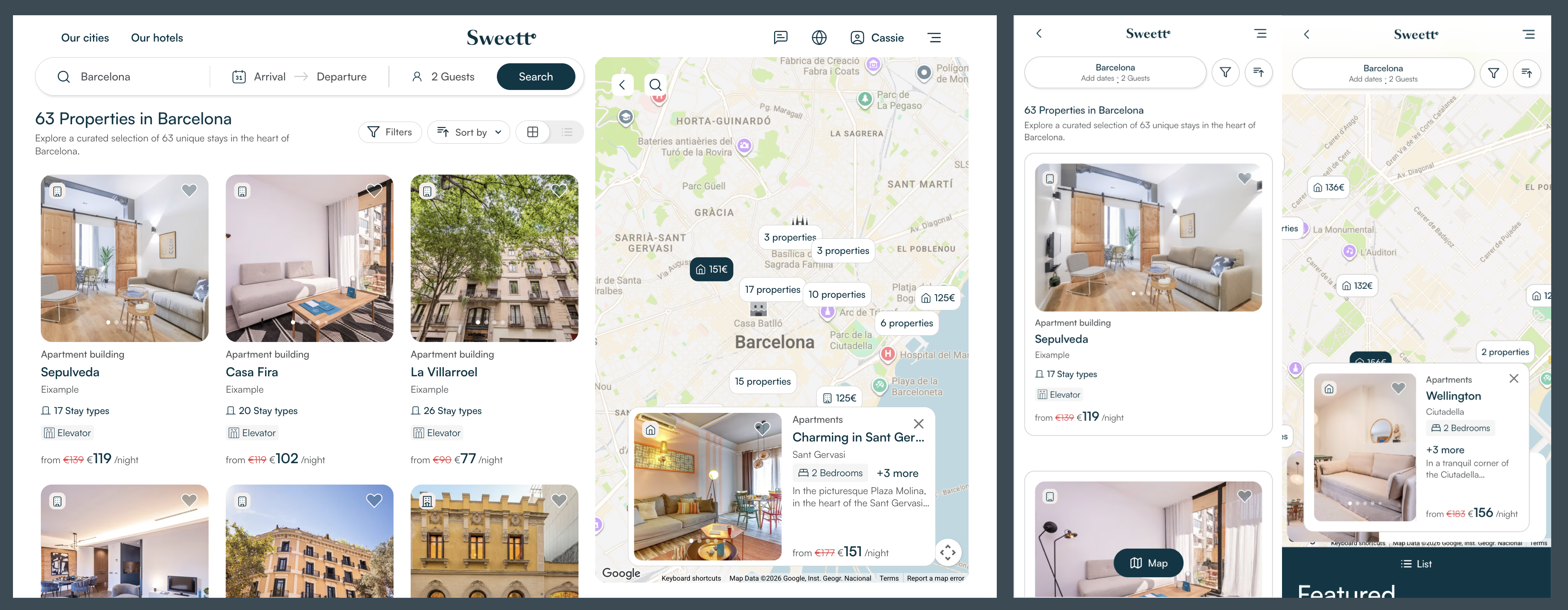
- Redesigned city and destination pages on the website and guest app for a cleaner browsing experience and better conversion
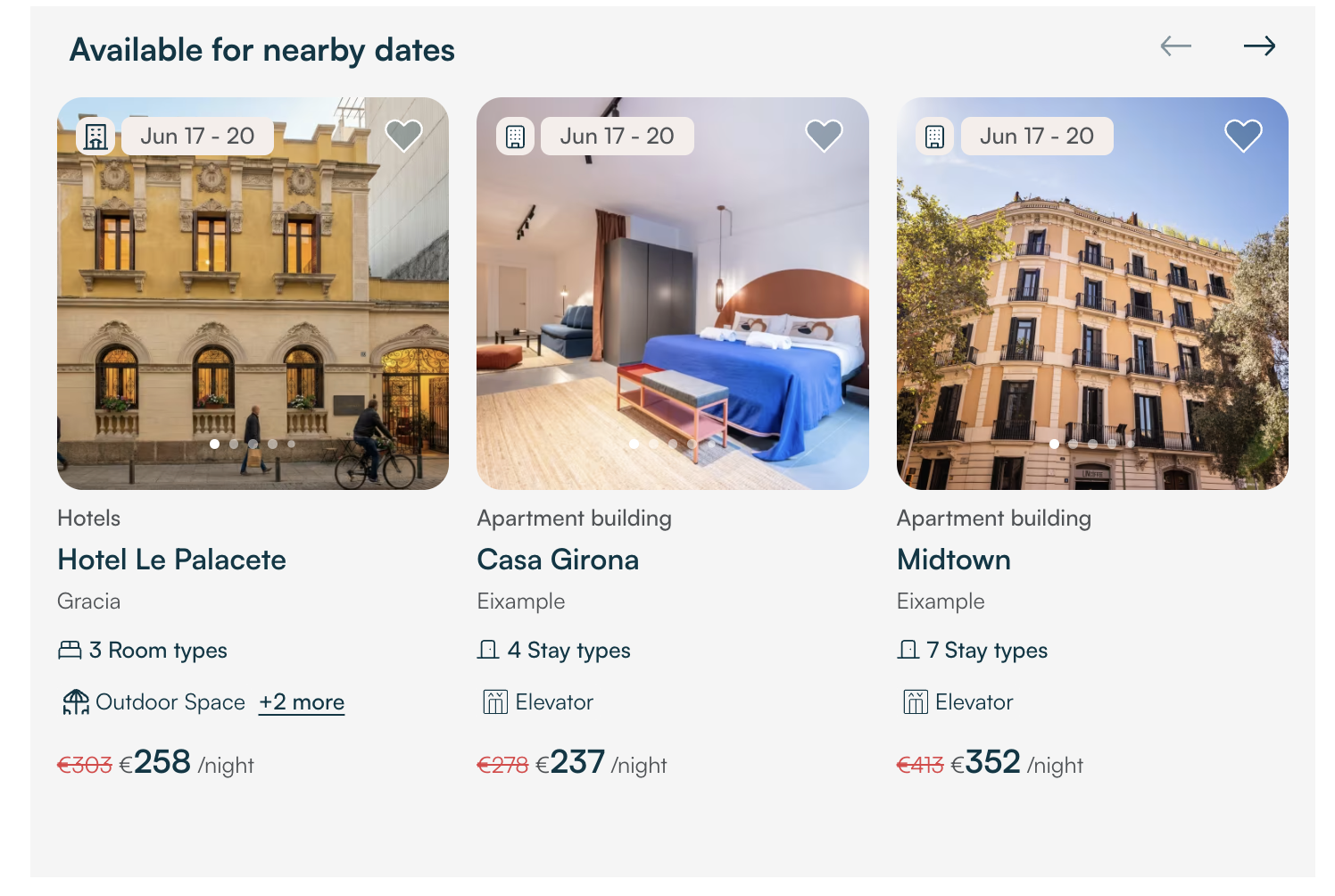
- A new nearby dates slider helps guests find available listings when their preferred dates are taken
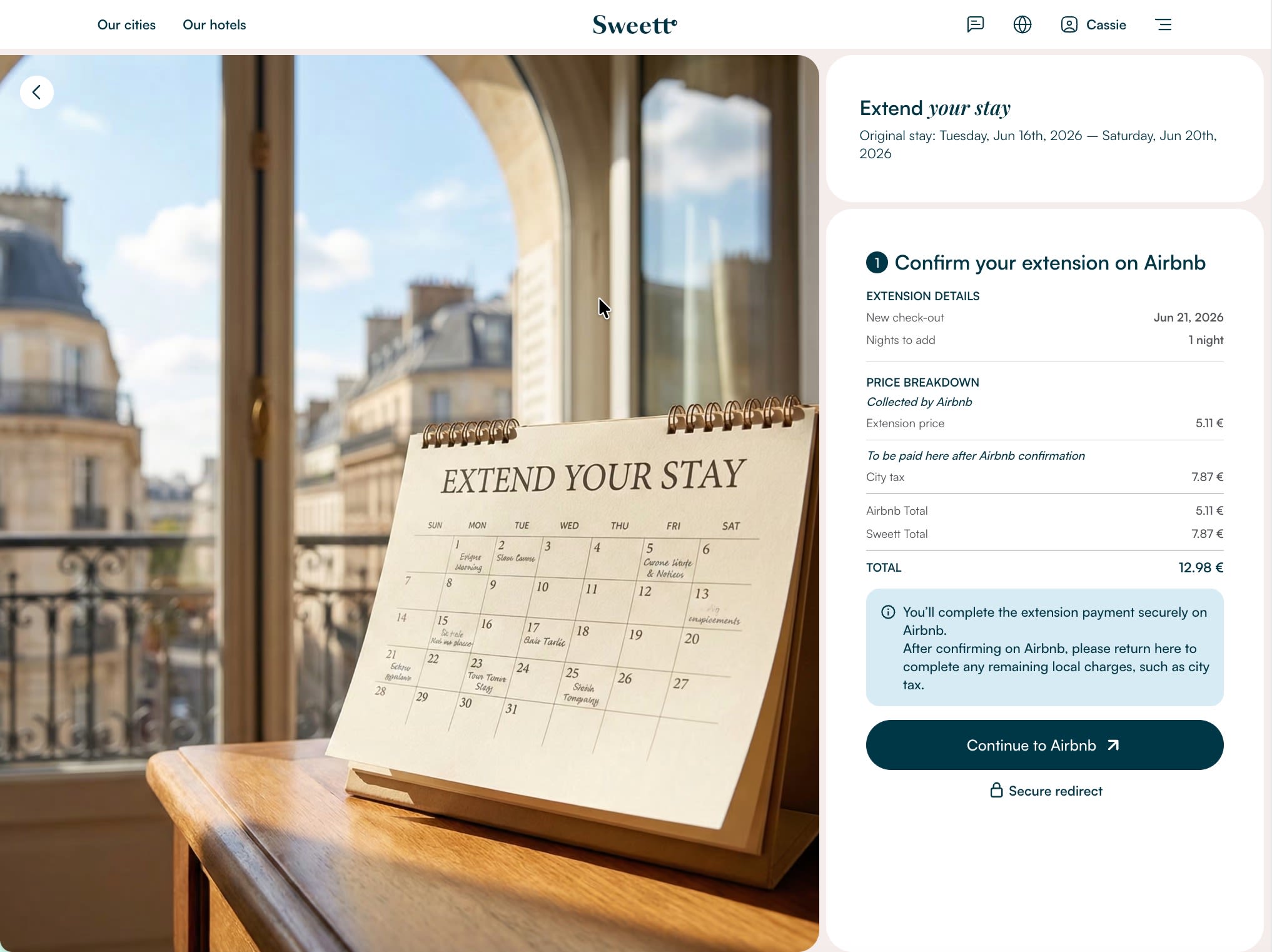
- Price breakdown added to the Airbnb extension quote for more guest transparency before confirming
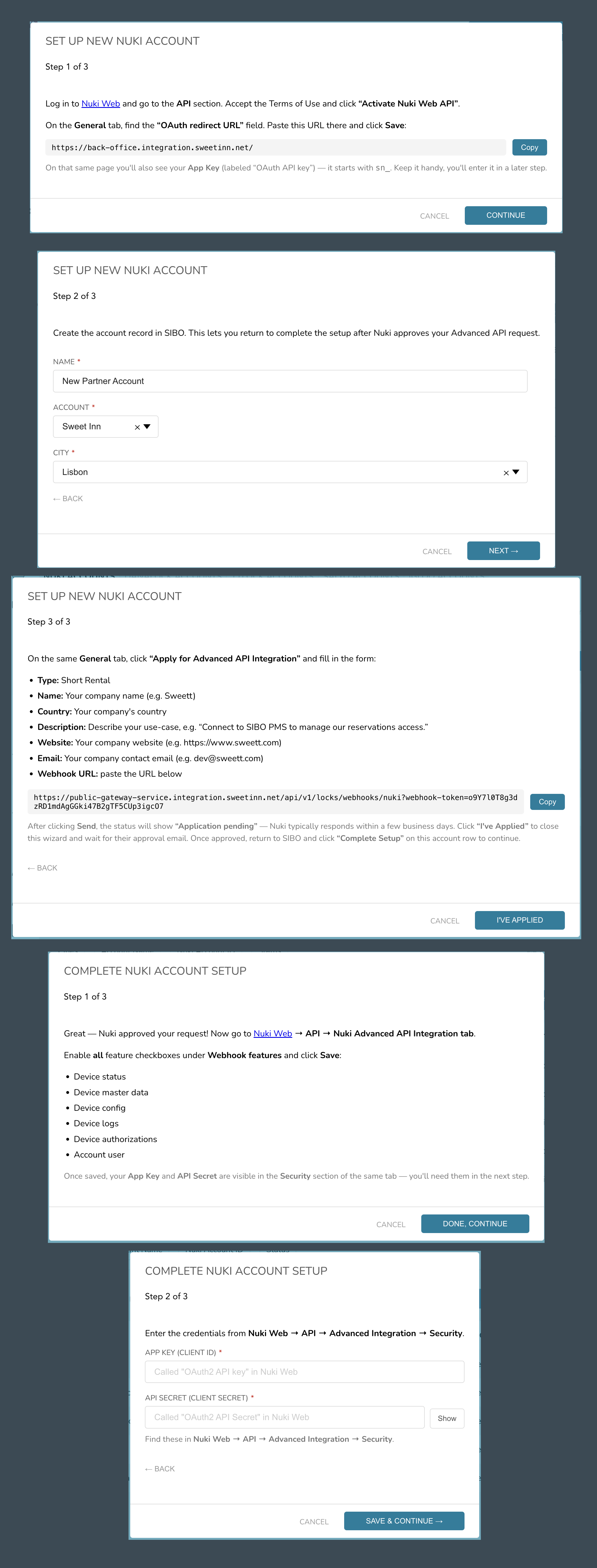
- Self-service Nuki onboarding — partners can now connect their smart locks on their own, without any help from the tech team
- Automatic detection and recovery of bookings that fail to complete during processing
- Yes/No questions now available in checklists for clearer, required staff responses
|
Redesigned City (Destination) Page
Better guest experience and higher booking conversion. Guests can now explore destinations more easily on the website and guest app. The updated page shows clearer information, better search, and a smoother experience to help guests decide where to stay.
|
|
Available for Nearby Dates Slider
Reduce drop-off and keep guests searching. When a guest picks dates that are not available, a new slider shows listings that are available on nearby dates. This helps guests stay on the website and find a suitable option instead of leaving the search.
|
|
Airbnb Extension — Price Breakdown
More transparency for guests before they confirm. The Airbnb extension quote request now shows a full price breakdown, so guests can see exactly what they are paying for before confirming their stay extension.
|
|
Full Nuki Onboarding Self-Service Flow
Faster partner onboarding with no dependency on the tech team. Partners can now connect their Nuki smart lock account to SIBO on their own, using a simple step-by-step wizard. No help from the tech or DevOps team is needed — the wizard handles all the technical setup automatically.
|
|
Website & App
Destination Discovery
- Redesigned City (Destination) Page
Better guest experience and higher booking conversion. The city and destination pages on the website and guest app have been fully redesigned. Guests can now explore locations more easily, with clearer and more useful information, better search, and a smoother experience to help them decide where to stay.
- Available for Nearby Dates Slider
Reduce drop-off and keep guests searching. When a guest selects dates that are not available, a new slider highlights listings that are open on nearby dates. This keeps guests engaged and helps them find a suitable option without leaving the search.
Guest App Experience
- Airbnb Extension — Price Breakdown
More transparency for guests before they confirm. The Airbnb extension quote request now includes a full price breakdown, so guests can clearly see what they are paying for before confirming their stay extension.
|
SIBO
Booking Recovery
- Detect and Recover Bookings That Fail to Complete
Prevent lost or missed bookings due to silent processing failures.
When a booking comes in from Airbnb or Rentals United, the system now checks that every step finishes correctly — saving the booking, updating search, creating tasks, and sending guest messages. If anything goes wrong and the booking doesn't fully complete, it's automatically flagged so the team can fix it.
Bookings
- Allow Authorized Agents to Reduce Booking Security Deposit
Give authorized agents the flexibility to handle security deposits based on each guest's situation.
Authorized B2B agents can now lower or remove the security deposit on an existing booking when the guest's situation warrants it. Changes are recorded in the booking log for full transparency. The option is permission-controlled and is locked once a deposit charge or pre-authorization is already in place.
Checklists
- Yes/No Questions in Checklists
Ensure accountability and accuracy in operations checklists.
Checklist creators can now add simple Yes/No questions to any checklist. Each one can be set as required, so staff must actively tap Yes or No before they can finish the task. This gives clear answers on inspection and maintenance checklists and helps avoid missed or skipped items.
User Management
- Admins Can Now Filter Users by Permissions
Easier access management and better security oversight.
Admins can filter the users list by specific resource permissions — for example, finding all users who can modify bookings or manage properties. Each permission is shown with a clear name and description, making it easy to understand what access it grants, both directly to individual users and through their assigned role.
Smart Access
- Full Nuki Onboarding Self-Service Flow
Faster partner onboarding with no dependency on the tech team.
Partners can now connect their Nuki smart lock account to SIBO on their own, using a guided step-by-step wizard. The wizard covers everything from Nuki Web configuration to account authorisation, and handles all the technical setup automatically in the background.
Property Details
- Room Count Mismatch Warning
Prevent sync errors caused by mismatched room counts on booking platforms.
Sometimes the room counts shown in the property form don't match what's actually synced to booking platforms. SIBO now shows a clear warning on the Property Details page when it spots a mismatch, so agents can fix it before it causes any sync problems.
|
Enhancements & Bug Fixes
- Enhancement Bookings & Tasks Sorted by DateSIBO
Faster search results for staff. Bookings and tasks are now indexed in search ordered by creation date, so the most recent items always appear first when staff search for them.
- Bug Fix Paid Delivery Report Wrong StatusSIBO
Ensure delivery tasks have the correct status from the start. When adding a paid delivery item (such as a baby high chair) through Tasks & Guest Requests, the related delivery task report was created with status NEW instead of IN PROGRESS. This has been fixed.
- Bug Fix ECI/LCO Auto-Handling FixedSIBO
Ensure all guests get timely ECI/LCO responses, regardless of property settings. Early check-in and late check-out requests on properties with non-standard times were silently skipped by the nightly cron — guests received no approval or decline. The system now uses each property's own check-in and check-out times instead of fixed defaults, so all eligible requests are processed correctly.
- Bug Fix Buildings Page Filters ResetSIBO
Avoid losing work context when navigating the Buildings page. When a user applied filters and then opened a building to view or edit it, the filters were cleared when the modal was closed. The page now returns to the same filtered results after closing.
- Bug Fix Pending Payment Incorrectly CanceledSIBO
Prevent missed payments caused by guest count updates. When a staff member updated the guest count on a booking, a pending payment scheduled for a future date was incorrectly canceled, leaving the booking with no outstanding balance and requiring manual steps to recreate the payment. This has been fixed.
- Bug Fix Reports Filter Badge Wrong CountSIBO App
Accurate filter visibility for staff on mobile. On the mobile Reports page, the active filters badge showed an incorrect count — it included sort order as a filter, missed team filters due to a sync issue, and removed sort order entirely when cleared instead of resetting to the default. Staff now see the correct count that reflects their actual applied filters.
- Bug Fix Calendar Filter Buttons Hidden on AndroidSIBO App
Fix usability issue for Android staff on the Calendar page. On Android devices with the navigation bar visible, the "Clear All" and "Apply" buttons on the Calendar city filter were hidden behind the system bar and could not be tapped. This has been fixed.
|
|
For training on these updates, please reach out to schedule a session.
For technical support, contact Tech-Support.
A full history of all version release notes is available here.
|
|