Release Notes - June 2026
(Version 38)
Dear Sweett Team,
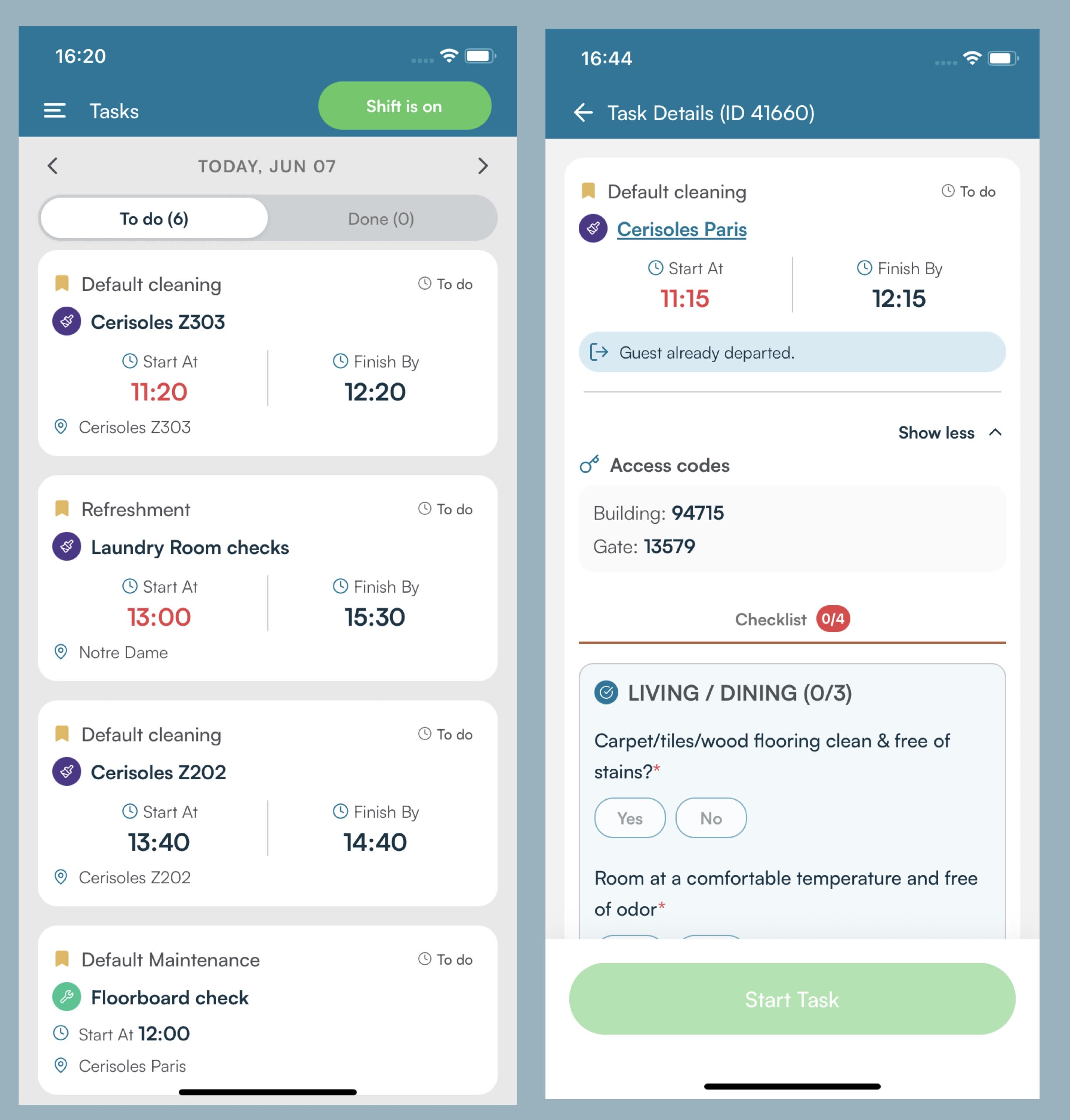
This is a big one for cleaners and maintenance technicians. The all-new native SIBO App My Tasks is live — task details, access codes, guest movements, checklists, file previews, and address lookup, all consolidated in one sleek screen.
Agents can now clock in and out, take breaks, and receive real-time push notifications the moment something on their schedule changes — all without leaving the app. They can decline a task with a clear reason, finish tasks with a new summary form flow, and tap any location name to instantly get the full address and navigate there.
And the app speaks your language — literally. AI-powered translations automatically convert report titles and descriptions into the agent's language. Whether a cleaner in Paris reads in French or a maintenance technician in Milan reads in Italian, every task shows up in the language they work in — no manual translation, no guesswork, no miscommunication on the ground.
The SIBO App just got a whole lot smarter.
|
SIBO App — My Tasks is Here!
Everything field agents need, all in one place. Task details, access codes, guest check-in and check-out times, checklists, file attachments, and address lookup — packed into a sleek, fast, native mobile experience. No more switching between screens. No more web views. Just one powerful hub for getting things done.
|
|
SIBO App — Push Notifications for Today's Tasks
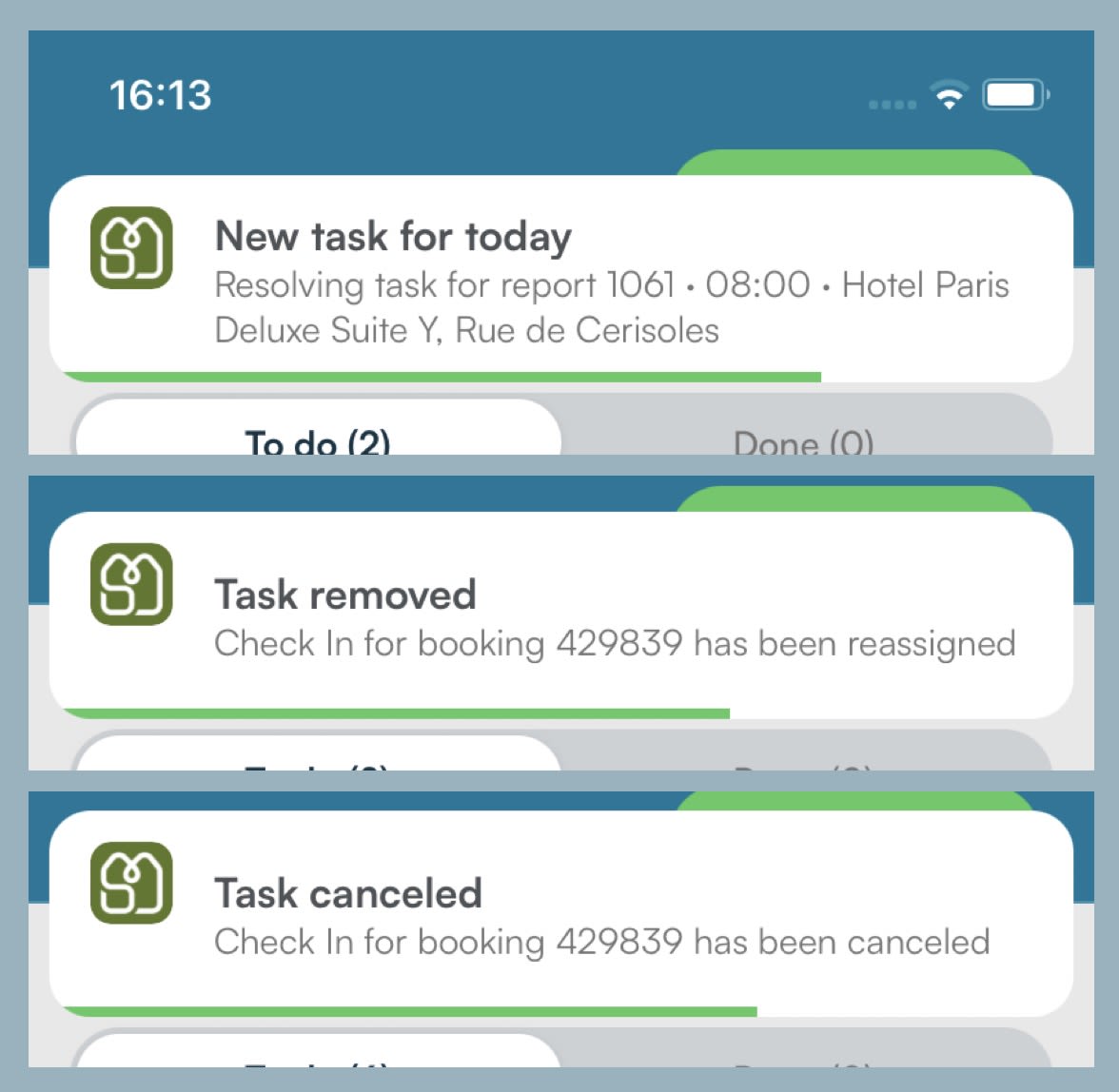
No more missed updates. Agents get a notification the moment a task is added, moved, reassigned, or canceled for today — and tapping it takes them straight to the task, even if the app was closed.
|
|
SIBO App — Shift & Break Controls
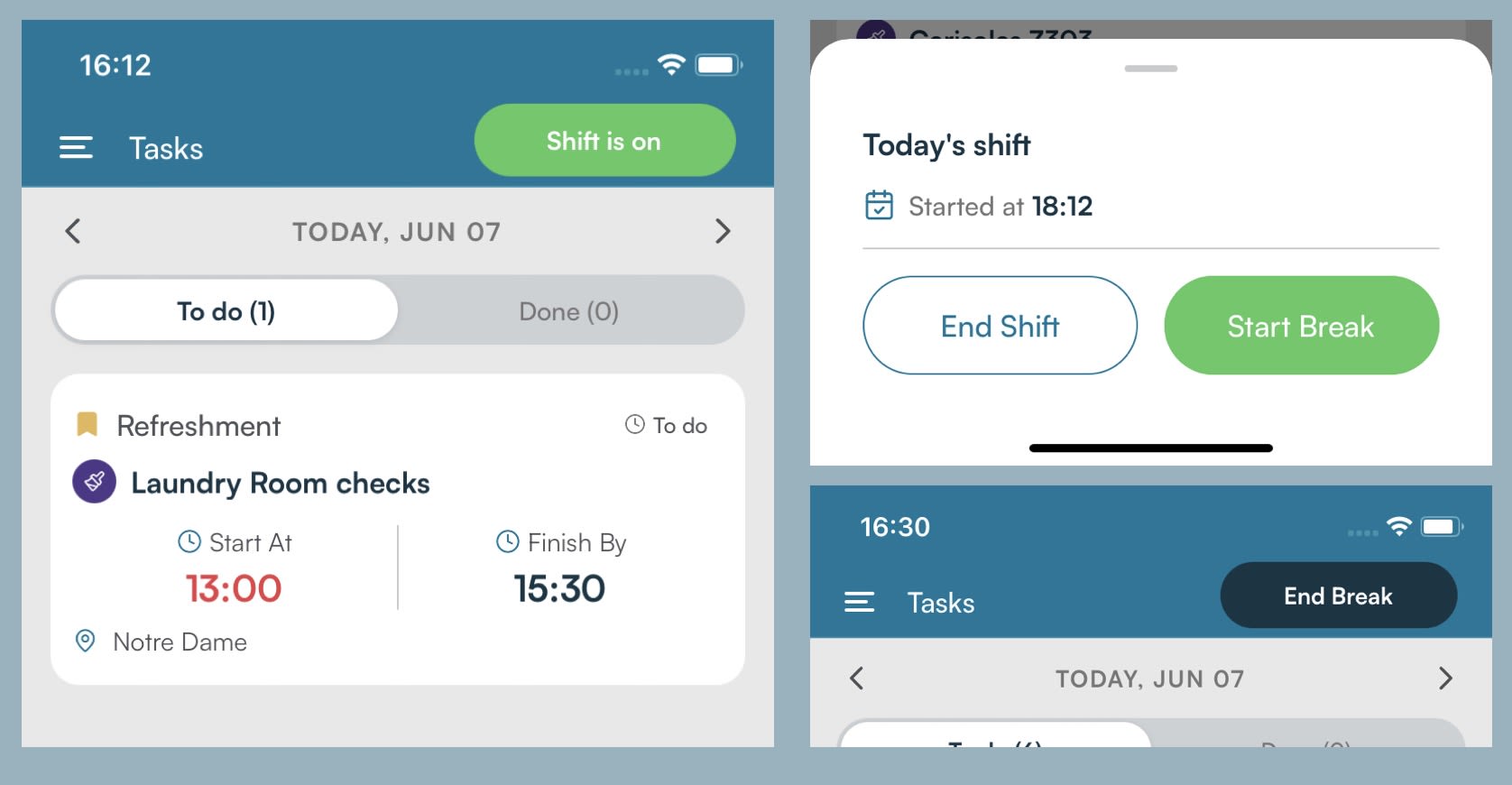
Clock in, take a break, clock out — all without leaving the app. The My Tasks header always reflects the agent's live shift state. One tap to start, one tap to pause, one tap to finish. The app even nudges agents to start their shift before opening a task, so nothing slips through.
|
|
SIBO
Direct Sales & Services
- Reduce Booking Deposit
Authorized agents can now lower or fully remove a booking's security deposit from the back office. The edit option appears on the deposit card for agents with the right permission, is disabled when an active pre-authorization or charge exists, and every change is recorded in the booking's system log with the agent's name, original amount, and new amount.
This feature is permission-gated. Contact R&D or your Partners Manager to enable it for the right users.
- Users Management — Quick Filter Presets
A new Quick Filter dropdown has been added to the Users Management search bar. Selecting a preset — such as "Discount up to 15%", "Can create coupons", or "Can reduce deposit" — instantly shows only users with that permission. The preset works alongside other active filters, and clearing it restores the previous view.
Integrations
- Nuki — Bridge Offline Detection
When a Nuki smart lock's bridge loses its connection, the system now detects this and marks the lock as offline on the IOT dashboard. Previously, the lock appeared healthy even when unreachable, causing entry codes to fail silently without any alert to the team.
SIBO App — Task Management
- My Tasks
The wait is over! The all-new native My Tasks screen is live for cleaners and maintenance technicians. Task details, access codes, guest movements, checklists, file previews, and address lookup — all consolidated in one sleek, fast screen. The old web-based Tasks and Cleanings screens have been retired. Every core workflow — viewing, starting, declining, finishing tasks, and navigating to locations — has been fully validated before rollout.
- Task Decline
Maintenance technicians can now decline a task they cannot take. When declining, they select a reason from a managed list that can be updated without a new app release. The reason is saved to the task and is visible to dispatchers in the back office. For tasks linked to a report, the task moves to Done and the report reopens. For standalone tasks, the task returns to the queue for reassignment.
- Finish Task & Task Summary
Maintenance technicians can mark a task as finished from the Task Details screen. For standard tasks, finishing is immediate. For tasks that require a summary, the technician completes a Task Summary form before the task closes. The submitted summary is available in the back office.
- Address Bottom Sheet
Any property or location name shown on a task card or in Task Details is now tappable. Tapping it opens a bottom sheet with the full address, making it easy for cleaners and technicians to navigate to the right location from anywhere in the app.
SIBO App — Shift & Notifications
- Shift & Break Controls
The My Tasks screen header now shows the agent's current shift state at all times. Agents can start and end their shift and take breaks with a single tap. All state changes are confirmed with a brief notification and reflected immediately in the UI. Opening a task without an active shift prompts the agent to start their shift first.
- Push Notifications for Today's Tasks
Agents receive a push notification whenever a task assigned to them for today is created, reassigned, rescheduled, or canceled. Tapping the notification opens the task detail screen directly.
|
Enhancements & Bug Fixes
- Enhancement Salto — Lock Code Preserved on AlterationSIBO
When a booking is altered to a property that shares the same Salto lock, the access code is no longer deleted. The lock code now remains intact when the destination uses the same lock.
- Enhancement Unified Inbox — Shift & Snooze LogicSIBO
Agents can now go off-shift even while conversations are snoozed — the snooze state no longer blocks the shift change. When a snoozed conversation wakes up while the assigned agent is off-shift, it is automatically unassigned so an active team member can pick it up.
- Bug Fix Guest Chat — Blank MessageWebsite/App
Guest chat no longer shows an empty message bubble when an agent reply includes text copied from Google Translate. The full message now displays correctly for guests.
- Bug Fix City Page — Nearby Dates PositionWebsite/App
The "Nearby Dates" section now appears in the correct place on the city page, below the property grid instead of above it.
- Bug Fix City Page — Search Dates from MapWebsite/App
When a guest selects dates and then opens a property from the map, the chosen dates are now carried over to the property page.
- Bug Fix City Page — Mobile Map Card OverlapWebsite/App
On mobile, selecting a property marker on the map now shows only the mobile card. The desktop card no longer appears underneath it.
- Bug Fix City Page — "Apartment" LabelWebsite/App
Property cards now correctly display "Apartment" in singular form instead of "Apartments".
- Bug Fix City Page — Invalid Date Range in URLWebsite/App
When a URL contains a date range where check-in is after check-out, the page now shows a clear validation message instead of the generic "No matches for your search" state.
- Bug Fix Recent Searches — City Name DisplayWebsite/App
Recent searches now show the correct city or apartment name instead of raw system codes (e.g. cities.moscova-iii).
- Bug Fix Installments — Pending Charges StuckSIBO
Fixed an issue where installment charges were getting stuck in a pending state and not progressing correctly.
- Bug Fix OCI — Marriott Booking Stuck on Payment StepSIBO
Fixed an issue where Marriott bookings were getting stuck on the Damage Waiver/Incomplete payments step during the online check-in flow.
|
|
For technical support, contact Tech-Support.
A full history of all version release notes is available here.
|
|